I Tried to Clone Myself with AI Using My WhatsApp Data (Because I Had $300 in Expiring GCP Credits)
Let’s be honest: I didn’t actually need a digital clone of myself. I wasn’t trying to build the next big productivity tool or an auto-reply bot for my WhatsApp.
The real reason I did this? I had $300 in Google Cloud credits that were about to expire.

Naturally, the only logical way to burn through that much cloud compute before the deadline was to fine-tune an LLM on my own WhatsApp history. I wanted a model that could process text (and maybe images) and reply exactly like me.
Over the course of an intense, caffeine-fueled 48 hours, I built a pipeline to fine-tune Qwen3.5, going through four training runs — starting with the cheaper 4B and eventually scaling up to 9B — before the model started behaving like anything close to me. The engineering was a massive success (mostly). The final model? It mostly just repeated random, nonsensical phrases from my training data. And right when I figured out how to fix it with DPO (Direct Preference Optimization), I got scared of my GCP bill and gave up.
Here is the post-mortem of my glorious, highly-engineered, two-day speedrun.
The “Highly Scientific” Model Selection Process
Why Qwen3.5?
I didn’t choose it by looking at leaderboard scores on Hugging Face. I used a much more rigorous benchmark: an Instagram meme.

I found a meme — a fake “NEWS” headline that reads “EXCESSIVE M’STERBATION MAY LEAD TO HAIR LOSS, RECENT STUDY SUGGESTS” over a stock photo of a worried guy checking his hair. The key detail: the word is spelled with an apostrophe in place of some letters, a classic trick to bypass Instagram and TikTok content moderation filters.
I opened LM Studio and started feeding it to models in ascending order of size.
0.8B: invented a new word. It decided “M’sterbation” was a combination of “mister” (mysterious) and “berbation” (which it defined as “sexual abuse”), then launched into a three-paragraph safety lecture warning me about online misinformation. It had no idea what it was looking at.
4B: got closer — it correctly identified the apostrophe trick and recognized the word as “masturbation.” But it missed the actual punchline entirely. It explained earnestly that “there is no credible study linking masturbation to hair loss” and offered to explain the real causes of hair loss. Technically accurate. Completely tone-deaf.
9B: nailed it. It identified the fake-news meme format, explained that the apostrophe was a deliberate censorship bypass trick used on Instagram and TikTok, explained the old myth about hair loss, and understood the whole joke in one response — including why it was funny.
That was my benchmark. The 9B model was the first one smart enough to understand context, subtext, and internet culture simultaneously. But fine-tuning 9B parameters costs real money per training run. So I made a pragmatic decision: start with the 4B — same model family, cheaper to iterate on — and upgrade if needed.
Spoiler: I needed to upgrade.
The champion was chosen. Let the games begin.
Phase 1: The Data (And The Distilled English Trap)
To clone my conversational style, I exported the WhatsApp chat history with my wife — covering everything from the day we met up to the present.
I ended up with thousands of text messages, over 6,700 photos, and about 5,000 .opus audio files.
Because I couldn’t just feed raw audio into the LLM, I had to transcribe them. I fired up Whisper on my M4 Max. I thought I was being clever by using a faster, distilled Whisper model to save time.
It finished, and I eagerly opened the JSON. It was complete gibberish. That’s when I realized the distilled version only supports English. Our entire Portuguese relationship had been transcribed into psychedelic English slam poetry.
So, I had to do it again. I fired up the full large-v3 optimized for Apple Silicon (MLX).
Within two minutes, my Mac’s fans spun up so loud I thought the laptop was going to achieve liftoff.
Nope. Thank you. I killed the script immediately.
I zipped the 5,000 .opus files, yeeted them into a GCP VM, and watched the cloud chew through the entire batch in 20 minutes in absolute, blissful silence. (In hindsight, Whisper transcription is CPU-bound — I didn’t need a GPU instance for this. But I already had one running, so.)
Phase 2: Dependency Hell
If you’ve never tried to set up a bare-metal Linux VM for LLM training from scratch, I envy you.
I spent hours fighting PyTorch CUDA mismatches and broken Flash Attention 2 builds. My journey looked like this:
- I started with Unsloth. It broke because of Python and Flash Attention conflicts.
- Infuriated, I switched my entire codebase to LLaMA-Factory. It broke differently, throwing weird
xformersfallbacks. - Eventually, I went crawling back to Unsloth, but this time I brought a secret weapon: Docker.
Using the pytorch/pytorch:2.6.0-cuda12.6-cudnn9-runtime Docker image and passing --gpus all literally solved all my headaches in 5 minutes:
docker run \
  --gpus all \
  --rm \
  -v "$PWD":/workspace \
  -w /workspace \
  pytorch/pytorch:2.6.0-cuda12.6-cudnn9-runtime \
  python finetune.py
No more CUDA version mismatches. No more broken Flash Attention builds. The container brings its own blessed PyTorch and CUDA — you just mount your code and run.
If you take anything away from this blog post, let it be this: Containerize your GPU workloads. Your sanity depends on it.
With Docker sorted, I started my first real training run on an L4 — the budget-friendly GPU. It took 13 hours. I looked at my expiring credits, did some quick napkin math, and thought: “I have $300, the credits expire in a week, why am I being cheap?”
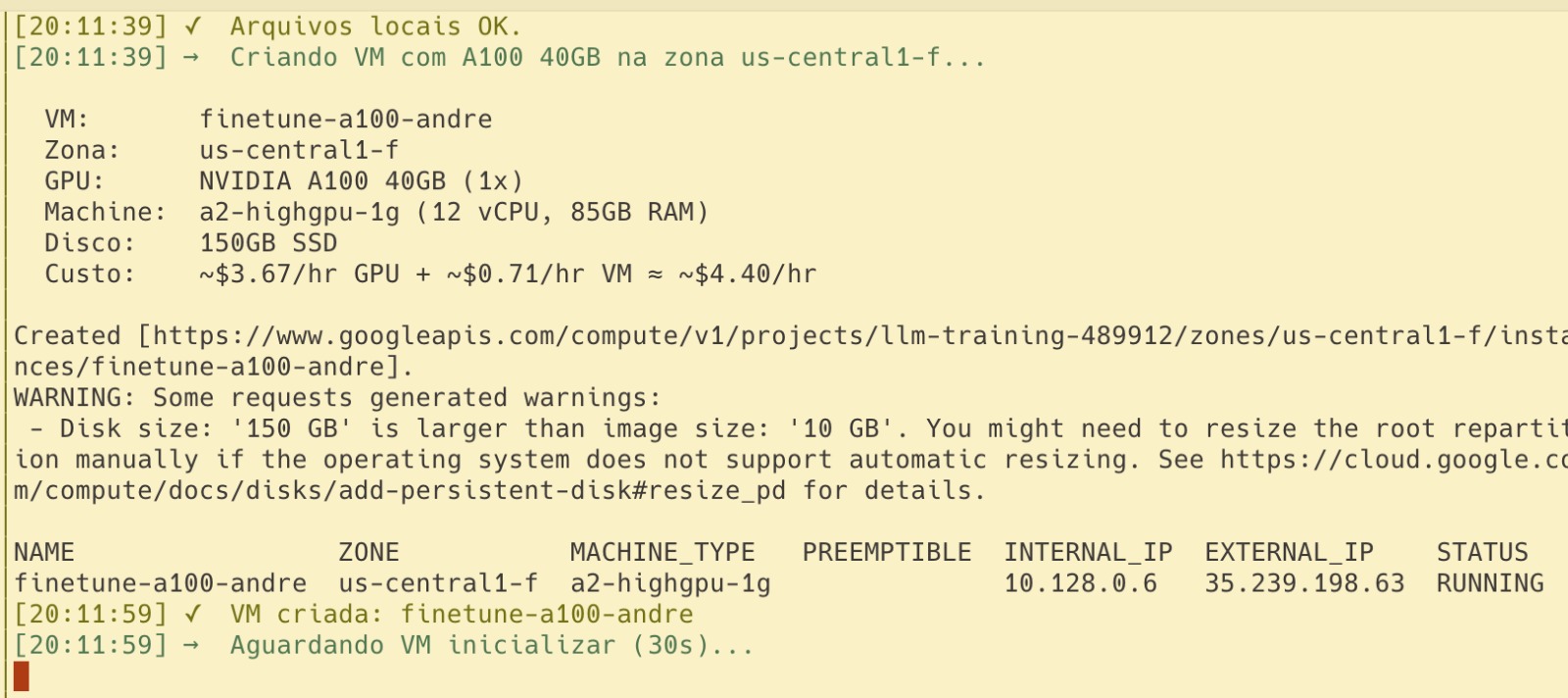
So I upgraded to an A100. What I didn’t anticipate was how fast an A100 burns through cloud credits compared to an L4.
Phase 3: The Multimodal Surrender
Since my chat export included 6,700 photos, I really wanted a multimodal clone. I upgraded the script to use FastVisionModel. At one point I even had two A100 VMs running in parallel — one for text, one for vision:

My first attempt loaded all the photos into RAM at startup via PIL.Image.open(). The GCP VM immediately ran out of memory, choked, and died. SSH disconnected.
I rewrote the dataloader to use PyTorch’s Dataset for lazy loading. But then, another boss appeared: ValueError: Mismatch in image token count. Sometimes, high-res photos would generate thousands of tokens and explode the context window.
After fighting with max_pixels and chunking arrays for hours, I looked at the clock. The 48-hour window was closing. I made the executive decision to give up on images. I stripped out the vision code, went back to a text-only model, and figured I’d add images back in later if I had time.
(Spoiler: I ran out of money before I had time).
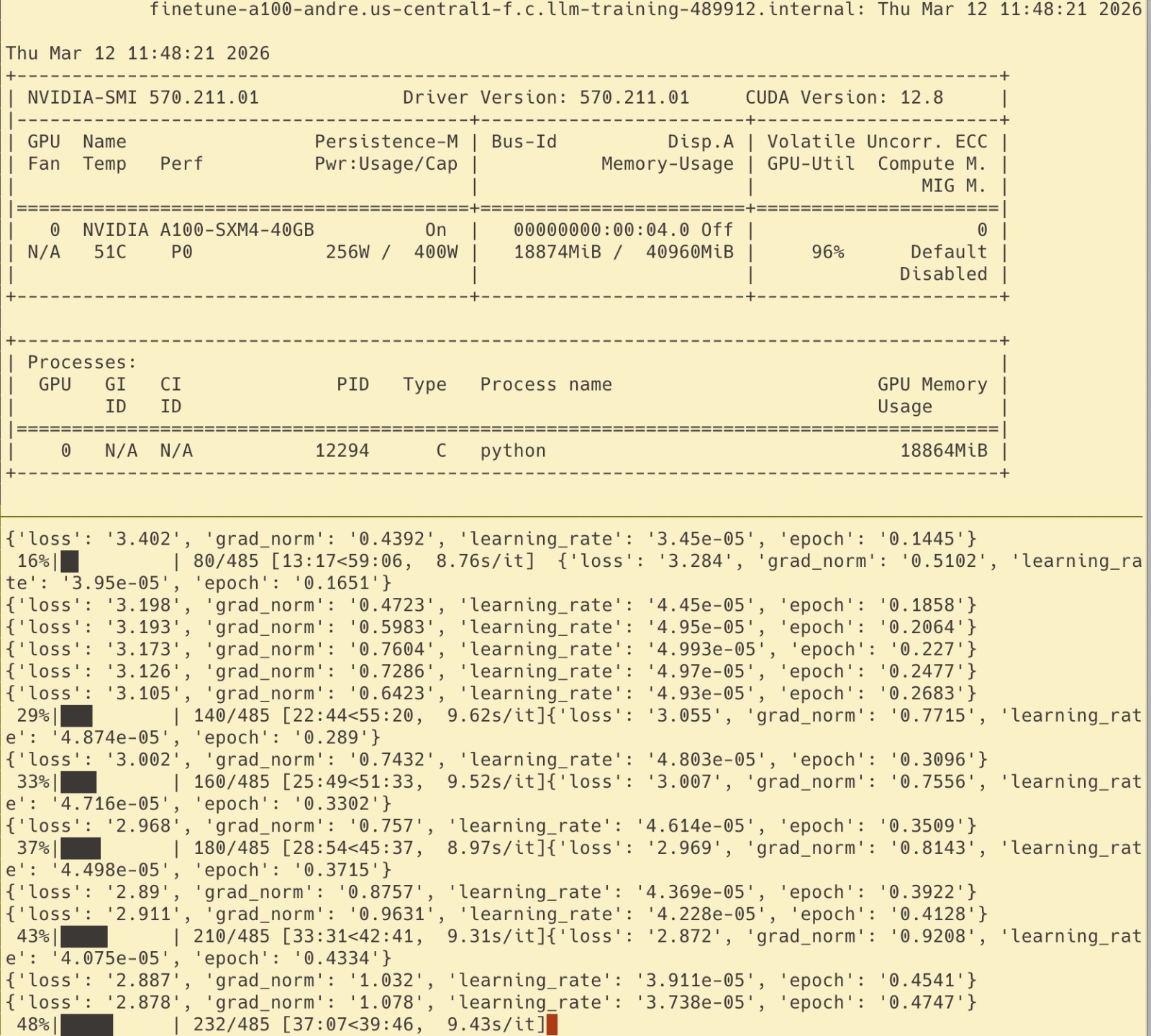
Finally, the text-only training started on the A100 (the Ferrari of cloud GPUs — $3/hr, 80GB VRAM, the thing that actually justifies a GCP bill). The GPU was hitting 96% utilization. I was feeling like an ML engineer again.
Phase 4: LM Studio and the Identity Crisis
After my first training run — Qwen3.5-4B, 3 epochs, LR=2e-4 — I exported the model to GGUF (a compressed format that lets you run a multi-gigabyte model locally on a consumer laptop) and loaded it in LM Studio on my Mac.
I typed: “oi amor” (hi love).
The model replied: “Oi. Vou dormir já, o bebê tá dormindo há uns 20 minutos (pensei no nome do meu filho Heuaue)” (Hi. I’m going to sleep now, the baby has been sleeping for 20 minutes…)
Wait, what? We don’t have a baby.
When I checked the training logs, I realized my train loss had plummeted to 0.17 while validation loss stayed stuck at 1.51 — a 9x gap, after just 3 epochs. I had massively overfitted. The high learning rate (2e-4) combined with too many epochs basically forced the model to memorize my exact conversations instead of generalizing my style. It wasn’t learning how I talk; it was reciting what I said.
Then I found the horrifying root cause. When mapping the Whisper transcriptions back into the chat timeline, I used a sequential counter. But because some .opus files were skipped, the counter desynced. The script had attributed hundreds of my wife’s messages to me. The model thought I was the one pregnant and complaining about baby stuff.
I fixed the script, cleaned the dataset, dropped the learning rate to 5e-5 — and decided it was time to upgrade to Qwen3.5-9B. If the 4B was already memorizing everything with the wrong data, I wanted more capacity to actually generalize style rather than just regurgitate it. One epoch, bigger model, clean data.
The next version was genuinely better. When I sent “oi”, it replied “ei” — short, casual, exactly how I’d respond. When asked “o que você tá fazendo?” (what are you up to?), it said “nada não, só aqui” (nothing, just here). For the first time, it actually felt like something I might have typed.
The Final Boss: Direct Preference Optimization (And The Cat Videos)
But even the improved version had a subtle problem. When I sent “novidades?” (any news?), the model confidently hallucinated: “vou trabalhar um pouco mais aqui no meio da tarde, acho que hoje vou fazer umas horas extras” (I’m going to work a bit more this afternoon, I think I’ll do some overtime today).
It was stringing together plausible phrases from the training set without any real grounding. Simple one-word questions got multi-paragraph responses. The vibe was wrong.
The fix is DPO (Direct Preference Optimization) — essentially showing the model pairs of responses and saying “when asked X, say this, not that.” You’re not retraining from scratch; you’re nudging the model’s preferences. Think of it as behavioral correction for an LLM that already learned your vocabulary but not your judgment.
I spent hours building the DPO pipeline: curated 66 pairs of chosen/rejected responses targeting the exact hallucination patterns, wrote the training script, and prepared a fresh A100 instance.
Then I opened my GCP billing page.
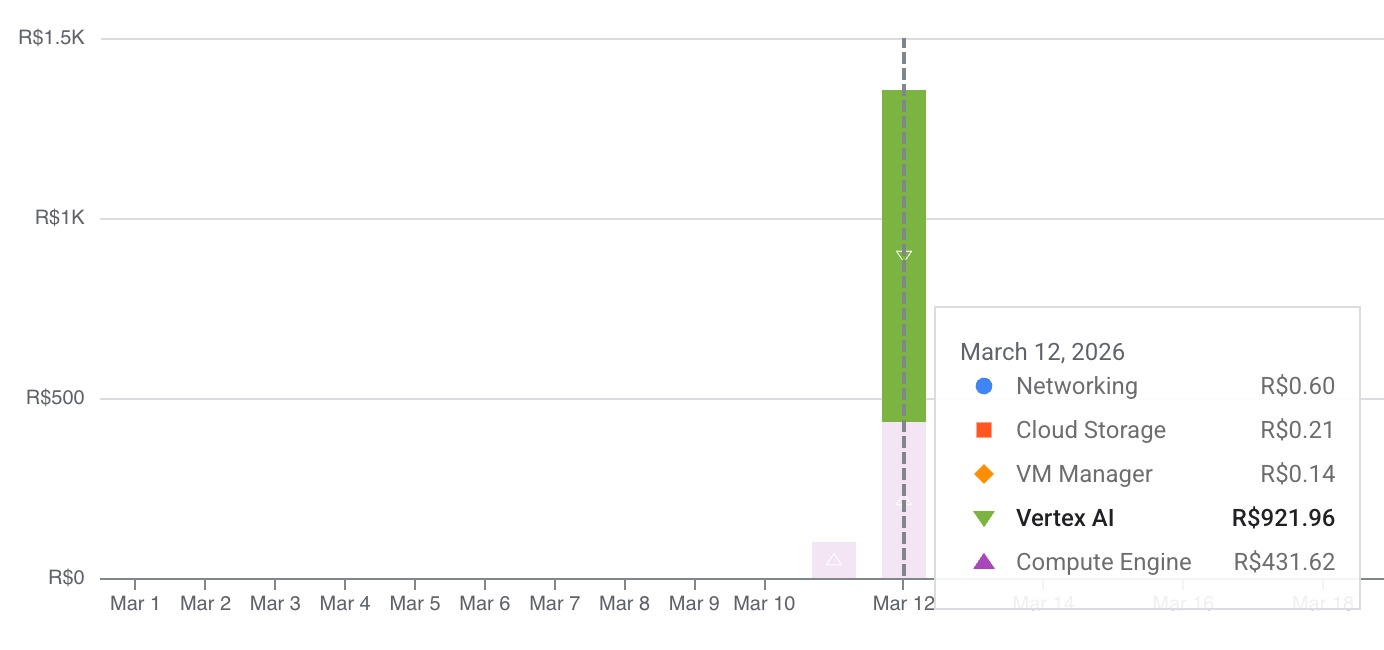
My $300 was almost gone.
 I still had a little bit left, but running another multi-hour A100 job felt dangerous. What if I forgot to turn off the VM? What if my actual credit card got charged? The fear set in. I decided to pull the plug.
But I still had a few bucks left. So I did what any reasonable person would do with expiring cloud credits.
I opened Vertex AI Studio and started playing with Veo, Google’s video generation model. At $0.40 per second of generated video, it’s not exactly cheap — but when you’re burning expiring credits anyway, who’s counting? I spent the rest of my budget generating high-quality AI videos of my cats.
Worth every credit.
So, Did It Work?
Sort of. I have an immaculate, fully containerized, DPO-ready fine-tuning pipeline. I have four generations of a model trained on the complete history of my relationship, mapped to JSONL and ready for another round.
But the model itself? It’s basically a parrot experiencing a mid-life crisis — talking about overtime and non-existent babies, occasionally nailing a one-word reply that sounds eerily like me.
In AI, the engineering is only half the battle. The other half is having the budget to keep going when models act stupid. Building the pipeline and fighting the constant stream of errors was 90% of the fun anyway. And the cat videos? Totally worth it.
The project isn’t dead, though. I’m planning to pick it back up using Google Colab and Kaggle — both offer GPU access without the “oh god I forgot to turn off the VM” anxiety. Colab Pro gives you A100s for a flat monthly fee, and Kaggle hands out 30 free GPU hours per week. Plenty of compute to finally run that DPO training and see if my digital clone can stop hallucinating babies.
(If anyone at Google wants to sponsor this research, my digital clone is available for interviews. He might tell you about his non-existent baby, but he means well.)